
Does my message sound rude? Fix the tone before you send.
Correct English can still sound cold. Lingently rewrites your message to sound more formal, friendlier or shorter, inside the app you're writing in.

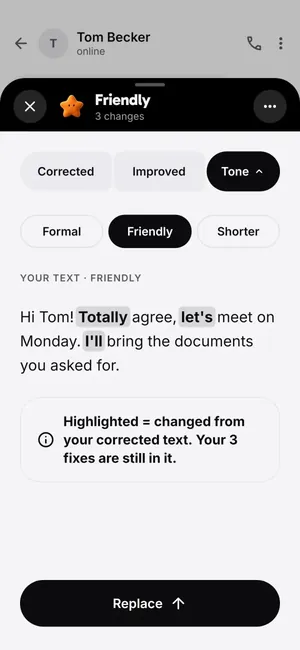
Lingently's tone rewrites change how your message sounds, not what it says. Write your email or message in any Android app, tap the character, and pick Formal, Friendly or Shorter. You get a rewritten version with your grammar fixes still in it, and one tap puts it back into the app. Tone rewrites are part of Lingently Pro, and every new phone gets 14 days of Pro free.
It's not a web tool. It works in the app where you write: Gmail, WhatsApp, Slack, LinkedIn and most others.
Why a correct message can sound rude
Grammar checkers look for mistakes. Tone problems usually aren't mistakes. They come from short, direct sentences that sound normal in your first language and sharp in English. Some common ones:
| What you wrote | How it can sound | A softer version |
|---|---|---|
| Send me the report today. | An order | Could you send me the report today? |
| As I said in my last email, the deadline is Friday. | Annoyed | Just a reminder that the deadline is Friday. |
| Why didn't you answer? | Blaming | I wanted to check if you saw my message. |
| I need this ASAP. | Pushy | Could you look at this when you have a moment today? |
| No. | Cold | Unfortunately that won't work for us, but here's what we can do. |
None of these has a grammar error. That's why a tone check is a separate step.
How the tone rewrite works
- Write your message in any app, with your own keyboard.
- Tap the character. You get the corrected version first, with each fix explained.
- Open Tone and pick one: - Formal for a client, a manager, HR or a landlord. - Friendly for a colleague or a group chat. - Shorter when you wrote three paragraphs and the point is in the last line.
- Tap Replace. The new version goes back into your message.
The changed words are highlighted, so you see what was softened and decide if it still sounds like you.
An example: emailing your manager
Your draft:
Hi Mark, I can't come to the meeting tomorrow. Send me the notes after.
Correct English, but it reads like a message to a friend, and "send me" sounds like an order. A Formal rewrite could read:
Hi Mark, unfortunately I won't be able to attend tomorrow's meeting. Could you please share the notes with me afterwards?
The Shorter version keeps it to one line when you're writing in a chat. You decide which one fits. For more phrases, see how to write a formal email and the sick leave message to your boss.
What's free and what's Pro
- Free: 5 checks a day, with the corrected and improved versions and the reason for each fix.
- Pro: tone rewrites (Formal, Friendly, Shorter), 1,000 checks a month, a daily lesson from your own mistakes, unlimited words, no ads. $47.99 a year or $6.99 a month.
- Every new phone starts with 14 days of Pro, with no card, so you can try the tone rewrites first.
Questions
How do I know if my email sounds rude?
Look for orders without "could you" or "please", "as I said", "ASAP", questions that start with "why didn't you", and one-word answers. If you're unsure, rewrite it in a more formal tone and compare the two.
Is there a free online tone checker?
Lingently doesn't have a web tone checker. It works inside the Android apps you write in. Tone rewrites are a Pro feature, and every new phone gets 14 days of Pro free.
Does the tone rewrite keep my grammar fixes?
Yes. The rewrite starts from your corrected text, so the fixes stay in.
Does it work in Gmail and Outlook?
Yes, and in WhatsApp, Slack, LinkedIn and most apps where you type. See grammar check in Gmail.
Your next message, already better.
Pick a buddy. It's free to start.
Free to start · No card
