
Check your English in WhatsApp, before you hit send.
A small character floats over the chat. Tap it, and your message comes back corrected, with one line on why.

Yes, you can grammar check WhatsApp messages on Android without copying them anywhere. Lingently floats over WhatsApp and WhatsApp Business. Type your message, tap the character, and the corrected message goes straight back into the chat, with a one-line reason for each fix. You keep your own keyboard.
Why WhatsApp is where the mistakes happen
WhatsApp is fast. You reply to your boss between meetings, to a landlord from the bus, to a new friend late at night. There is no time to copy the text into a grammar checker, and the keyboard's red lines only catch spelling. "I am agree", "I have 30 years" and "we can discuss about it" are spelled correctly, so they go straight through.
Lingently works inside the chat. You write your message the way you always do. When you want a check, you tap the character at the edge of the screen.
How it works in WhatsApp
- Type your message in any chat or group, in WhatsApp or WhatsApp Business.
- Tap the character. Lingently reads the text field you're typing in, and only that field, only when you tap.
- See the fixes. Each mistake is struck through and corrected, with a one-line reason: "agree" is a verb in English, so you don't need "am".
- Tap Replace. The corrected message goes straight back into WhatsApp. Then you send it.
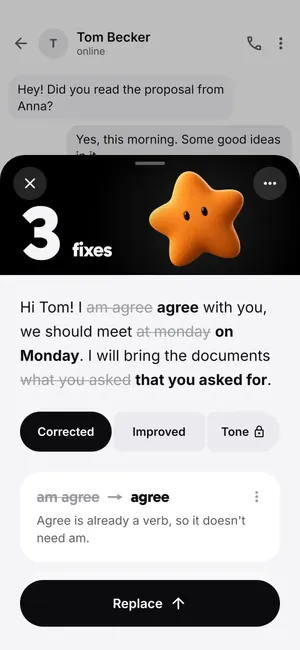
On Pro you can also change the tone: more formal for a message to your manager, friendlier for a group chat, or shorter when you wrote too much. More on the tone checker page.
Messages it fixes every day
| The message | After the check |
|---|---|
| Hi, I am agree with the new schedule. | Hi, I agree with the new schedule. |
| Sorry, I can't go to work today, I have fever. | Sorry, I can't come in today. I have a fever. |
| Can you explain me the rent contract? | Can you explain the rental contract to me? |
| I will send it until Friday. | I will send it by Friday. |
Grammarly for WhatsApp, or Lingently?
Both work in WhatsApp on Android. Checked on 18 October 2026: Grammarly's Android guide describes a floating widget that suggests fixes as you type, in English. If you want every word checked live and you only write in English, that suits you.
Lingently checks when you tap, looks at the whole message at once, and explains each fix in one line. It checks English, Spanish, French, German and Portuguese, and it turns your mistakes into practice. It's built for people who write in English as a second language. The full comparison is on Lingently vs Grammarly.
Learn from your own messages
Every fix is saved for practice. A few minutes a day, Lingently asks you to redo your own sentences, so the mistake you made in a WhatsApp message on Monday is the one you fix for good by Friday. You also see your patterns: which mistakes keep coming back, and which ones you've beaten.
Need words for a hard message? See how to write a WhatsApp message to your boss.
What Lingently can see
- Only the text field you're typing in, and only when you tap.
- Your text is sent securely to be checked, then deleted.
- Never password fields or SMS.
- Nothing changes in your message until you tap Replace.
Read the Privacy Policy for the details.
Questions
Does Lingently work in WhatsApp Business?
Yes. It works in WhatsApp, WhatsApp Business and most other apps where you type, including Gmail, Slack, Messenger and your browser.
Do I need to change my keyboard?
No. Lingently is not a keyboard. Keep Gboard, Samsung Keyboard or whatever you use now. The character floats over your apps and checks the message when you tap it. See grammar keyboard vs floating checker.
Does it read my chats?
No. It reads only the message you're typing, and only when you tap. It doesn't read the messages you receive. Your text is sent securely to be checked, then deleted.
Can it check messages in Spanish or Portuguese too?
Yes. Lingently checks English, Spanish, French, German and Portuguese. Pick the language you write in when you set it up.
Is it free?
Every new phone starts with 14 days of Pro, no card needed. After that you keep the Free plan with 5 checks a day, or choose Pro for $47.99 a year or $6.99 a month.
Your next message, already better.
Pick a buddy. It's free to start.
Free to start · No card
